
Spendroid - Finance Manager5.3.0 - Google Play
You'll be able to see results in few seconds.
Publisher Description
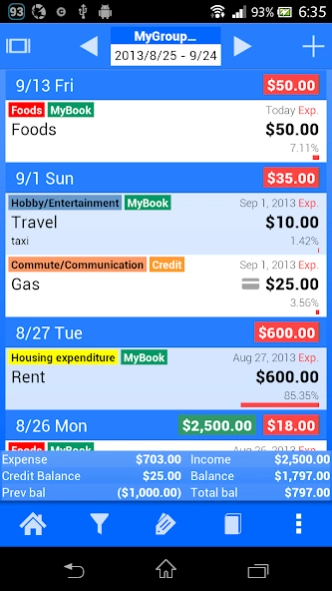
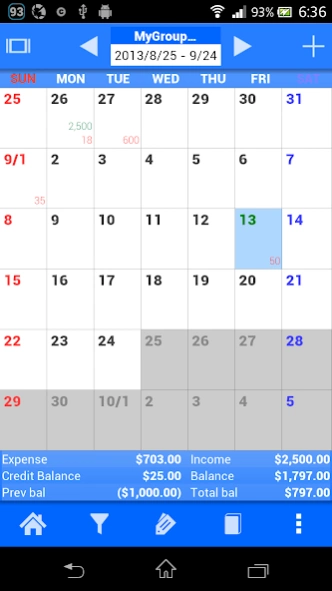
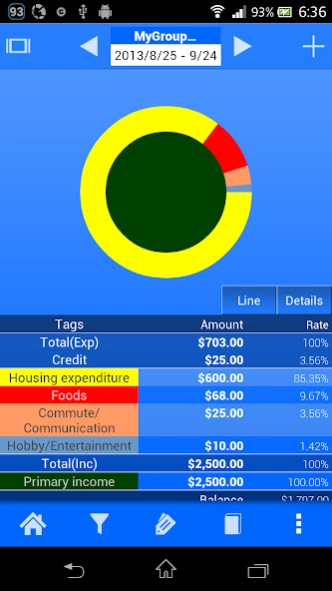

Start managing your daily expenses today with Spendroid!
Spendroid is an easy-to-use, colorful and fun personal-financial app.
With 3 beautiful views - calendar, list and charts, you can easily track your incomes and expenses and save your money effectively.
It also supports your spending on credit cards, foreign currencies, multiple accounts, and etc to manage your entire money assets.
These features will help you when you travel the world or have accounts with different currencies.
You can create more effective spending logs and maybe have fun with little efforts sucn as attaching photos and memos.
Spendroid also offers many useful tools to visually analyze your spending habits including filters, filter-sets, charts and group aggregation features.
Features:
★ Calendar, List and Chart views
★ Easy to input with a calculator pad
★ Credit card support
★ Attach photo
★ Theme color for each books
★ Auto backup for data security
★ Auto input for recursive items
★ Multiple books
★ Book group
★ Backup to Dropbox(paid version only)
★ Multiple currencies in a book, Book for specific foreign currency accounts.
★ 2 level - customizable categories with a lot of pre-installed items.
Advantages on the paid version:
● No ads
● Dropbox backup
● Unlimited number of books (accounts)
About Spendroid - Finance Manager
The company that develops Spendroid - Finance Manager is flictec Inc.. The latest version released by its developer is 5.3.0.
To install Spendroid - Finance Manager on your Android device, just click the green Continue To App button above to start the installation process. The app is listed on our website since 2020-03-22 and was downloaded 0 times. We have already checked if the download link is safe, however for your own protection we recommend that you scan the downloaded app with your antivirus. Your antivirus may detect the Spendroid - Finance Manager as malware as malware if the download link to jp.co.kenmiya.AccountBook is broken.
How to install Spendroid - Finance Manager on your Android device:
- Click on the Continue To App button on our website. This will redirect you to Google Play.
- Once the Spendroid - Finance Manager is shown in the Google Play listing of your Android device, you can start its download and installation. Tap on the Install button located below the search bar and to the right of the app icon.
- A pop-up window with the permissions required by Spendroid - Finance Manager will be shown. Click on Accept to continue the process.
- Spendroid - Finance Manager will be downloaded onto your device, displaying a progress. Once the download completes, the installation will start and you'll get a notification after the installation is finished.
Program Details
System requirements
Download information
Pricing
Version History
version 5.3.0
posted on 2020-03-23
Fixed showing unexpected warning message on Android 10
version 5.2.6
posted on 2018-01-18
BugFix:
●Fixed at Dropbox backup and restore issue
version 5.2.5
posted on 2015-12-20
2015/12/21 v5.2.5,BugFix:,●Total value is miscalculated after edited fixed cost,2015/12/16 v5.2.4,BugFix:,●Recursive costs inserted multiple times,●Crash on Android 6.0,2015/12/10 v5.2.3,BugFix: Crash on recored editor,2015/12/08 v5.2.2,BugFix:,●Cannot launch from shortcut icons,●Cannot launch from reminder notification,●Number of days in fixed cost editor was incorrect,2015/11/20 v5.2.1,●UI Updates,●Unlimited number of accounts,●Bug fix,●Suport for upgrading phone using online backup
version 3.1.2
posted on 2011-04-29
Several fixes and updates
Disclaimer
Official Google Play Link
We do not host Spendroid - Finance Manager on our servers. We did not scan it for viruses, adware, spyware or other type of malware. This app is hosted by Google and passed their terms and conditions to be listed there. We recommend caution when installing it.
The Google Play link for Spendroid - Finance Manager is provided to you by apps112.com without any warranties, representations or guarantees of any kind, so access it at your own risk.
If you have questions regarding this particular app contact the publisher directly. For questions about the functionalities of apps112.com contact us.
